How Nonprofits Can Get the Google Ad Grant: A Step-by-Step Path to $10,000 Per Month in Google Search Ads
A complete guide for nonprofits to secure $10,000/month in Google Ad Grants. Learn eligibility, compliance, and how to drive traffic to your RaffleGives campaigns.
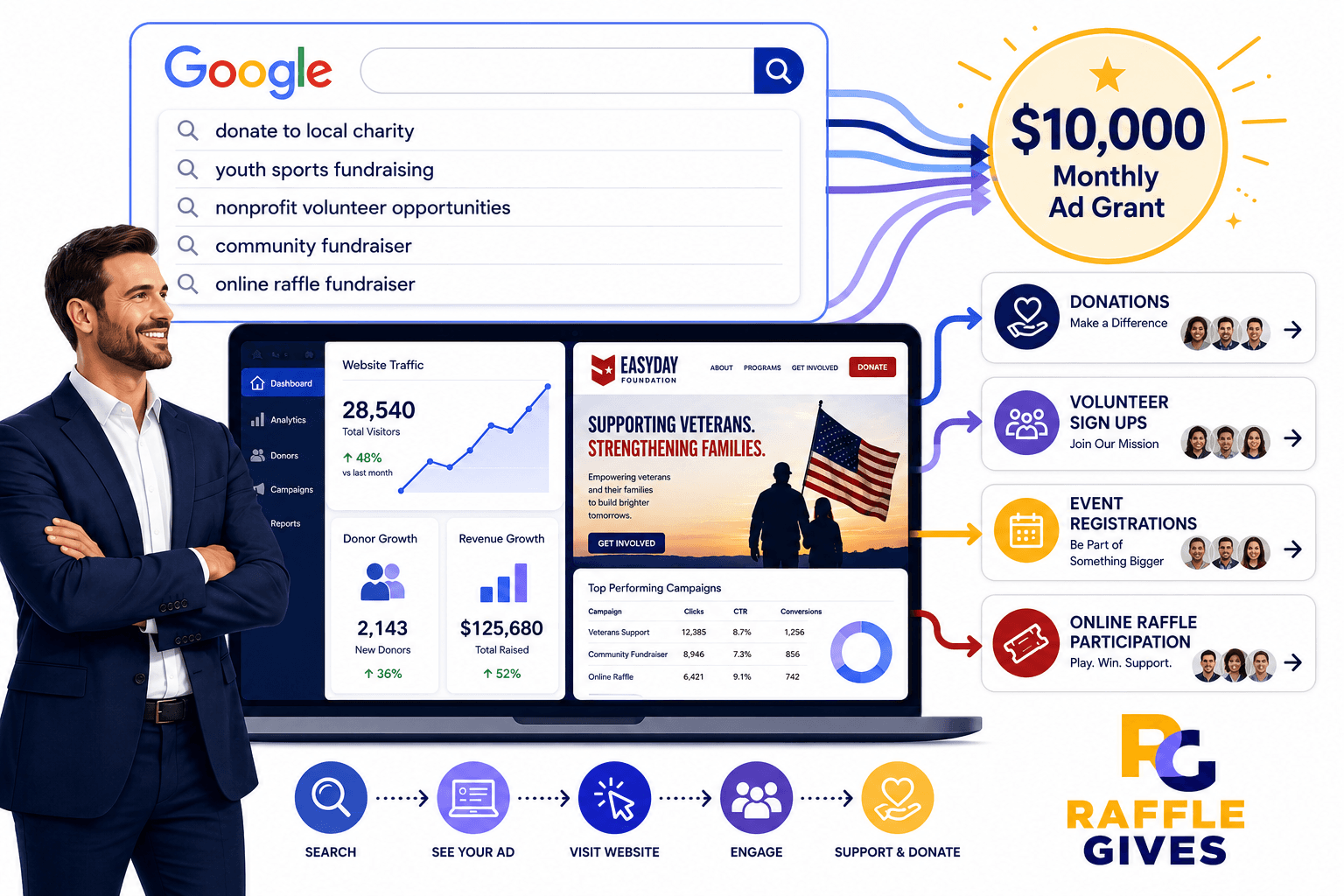
For many nonprofits, the hardest part of fundraising is not the quality of the mission. It is visibility.
People may care deeply about your cause, but they cannot support your organization if they never find you. Whether you are hosting an annual gala or running a statewide digital raffle, that is where the Google Ad Grant becomes a powerful tool.
The Google Ad Grant gives eligible nonprofits access to up to $10,000 per month in Google Search advertising. These are the ads that appear when someone searches on Google for topics related to your mission, programs, services, donation opportunities, or fundraising events.
The program used to be commonly associated with “Google AdWords.” Today, Google AdWords is called Google Ads, and the nonprofit advertising program is called Google Ad Grants. This guide walks through the practical path to getting approved, activating the grant, setting up the account correctly, and using those ads to drive real fundraising results—like ticket sales for your next RaffleGives campaign.
What Is the Google Ad Grant?
The Google Ad Grant is an in-kind advertising program for eligible nonprofit organizations. Instead of paying for search ads with a credit card, approved nonprofits receive monthly advertising credit that can be used for Google Search campaigns.
The grant can help nonprofits increase awareness of their mission, drive traffic to key program pages, and promote donation campaigns. It is also highly effective for recruiting volunteers, increasing event registrations, encouraging newsletter sign-ups, and driving participation in digital fundraising initiatives. Ultimately, it builds long-term visibility around important community issues.
The grant does not replace your core fundraising efforts, email marketing, or donor relationships. It works best when it sends the right people to strong landing pages with clear calls to action—such as a dedicated RaffleGives campaign page where supporters can easily purchase a raffle ticket.
Step 1: Confirm That Your Nonprofit Is Eligible
Before applying, confirm that your organization meets Google’s eligibility requirements.
For U.S.-based organizations, the nonprofit generally needs to be recognized by the IRS as a 501(c)(3) charitable organization. The organization must also be in good standing and meet the requirements for Google for Nonprofits, including verification by Google's validation partner, Goodstack.
Some organizations are not eligible for Google for Nonprofits or Google Ad Grants. These include government entities, hospitals or healthcare organizations (though charitable arms or foundations associated with them are eligible), and schools, academic institutions, or universities (philanthropic arms of educational organizations are eligible). Additionally, fiscally sponsored organizations that do not have their own 501(c)(3) status are currently not eligible.
Eligibility Checklist
Before moving forward, gather the necessary information and access rights as outlined below.
Requirement | Description |
|---|---|
Legal Information | Legal nonprofit name and EIN or nonprofit registration number. |
Tax Status | IRS 501(c)(3) confirmation, if U.S.-based. |
Digital Assets | Main website URL and administrative access to the website. |
Account Access | Google account that will manage Google for Nonprofits. |
Authorization | Contact information for someone authorized to represent the organization. |
Step 2: Prepare the Website Before Applying
A weak website is one of the most common reasons nonprofits struggle with Google Ad Grants approval.
Google’s website policy wants to see that the website is legitimate, useful, secure, and clearly connected to the nonprofit’s mission. The site does not need to be overly complex, but it should be complete and functional.
Website Content and Technical Requirements
Your website should clearly show the nonprofit’s mission, who the organization serves, what programs or services it provides, and how donations are used. It must also include information on how people can get involved, contact details, nonprofit identity or registration information, and a working donation page if donations are part of the strategy. Current, original, and substantial content is required.
Furthermore, the website must meet basic technical standards to provide a high-quality user experience.
Technical Standard | Details |
|---|---|
Domain Ownership | The nonprofit must own or control the domain. |
Security | The site must use HTTPS across all pages. |
Performance | Pages must load quickly and the site should work well on mobile devices. |
Usability | Navigation must be simple and clear. Links, buttons, forms, and donation pages should function correctly. |
Quality | The site should not be filled with broken links, placeholder content, or “under construction” pages. |
Commercial Activity | Limited commercial activity is allowed, but it must not be the primary focus of the site. |
Content Quality Matters
A thin website with only a homepage and a donation button is usually not enough. Google wants to see that visitors will get value after clicking an ad. Building comprehensive pages before applying will make it easier to build strong ad campaigns later.
Recommended Pages | Purpose |
|---|---|
About Us & Mission | Explains the core purpose and history of the organization. |
Programs & Impact | Details the specific services provided and the measurable results achieved. |
Get Involved | Includes pages for "Donate," "Volunteer," and fundraising "Events" (like your digital raffle). |
Information & Support | Provides a "Contact" page, "Frequently Asked Questions," and a blog or resources section for community education. |
Step 3: Request a Google for Nonprofits Account
The Google Ad Grant is activated through Google for Nonprofits. The nonprofit must first create or access a Google for Nonprofits account.
The basic process is:
- Go to Google for Nonprofits.
- Sign in with the Google account that should manage the nonprofit account.
- Enter the nonprofit’s legal information.
- Submit the organization for verification.
- Wait for Google’s validation partner, Goodstack, to confirm the nonprofit’s eligibility.
- Respond quickly if additional documentation is requested.
Most organizations should expect verification to take several business days. Some may take longer if the information does not match public records or if additional documents are required.
Common Verification Issues
Verification can be delayed when the legal name does not match IRS or registry records, the EIN is entered incorrectly, or the person applying cannot prove affiliation with the nonprofit. Other issues include the website not clearly matching the nonprofit, the organization using a fiscal sponsor instead of its own nonprofit status, or the nonprofit’s public information being outdated. To avoid delays, make sure all legal and public details are consistent.
Step 4: Activate Google Ad Grants
Once Google for Nonprofits is approved, the organization can activate Google Ad Grants from inside the Google for Nonprofits dashboard.
Important: Do not create a normal Google Ads account yourself for the grant application. During the Ad Grants activation process, Google provides the appropriate grant account.
The activation process generally includes:
- Signing in to Google for Nonprofits.
- Selecting Google Ad Grants.
- Submitting the website URL for review.
- Confirming that the website uses HTTPS.
- Watching the required welcome video.
- Confirming completion of the video.
- Submitting the activation request for review.
- Waiting for approval and instructions.
Google typically reviews the Ad Grants activation request and then sends the next steps by email within 3 business days.
Step 5: Set Up Tracking Before Launching Campaigns
The grant is not just about getting clicks. It is about driving meaningful action.
Before campaigns go live, the nonprofit should set up tracking so the organization can measure whether traffic is producing results. Useful conversion actions include donations, volunteer sign-ups, newsletter subscriptions, event registrations, and contact form submissions.
For organizations running digital raffles through platforms like RaffleGives, tracking ticket sales as a conversion action is critical. Because RaffleGives provides a dedicated, secure page for your campaign, you can measure exactly how much revenue your Google Ads are generating.
For most nonprofits, the easiest structure is:
- Install Google Analytics 4.
- Use Google Tag Manager if the website allows it.
- Create conversion events for meaningful actions (like a completed raffle ticket purchase).
- Import or connect conversion data into Google Ads.
- Test each conversion to confirm it fires correctly.
Do not rely only on soft metrics like homepage visits or time on site. Those may be useful for internal reporting, but the account should prioritize actions that show real engagement, and such soft metrics must be excluded from "Conversions" in Google Ads.
Step 6: Build Campaigns Around Mission-Based Searches
Once your account is approved, maintaining your account according to Google’s account management policy becomes the most important thing your nonprofit can focus on. Google Ad Grants campaigns should be tied directly to the nonprofit’s mission and user intent.
A good campaign is not built around broad words like “donate,” “charity,” or “help.” Those terms are too generic. Instead, focus on searches that show a specific need, interest, or action.
Example Campaign Structure
Each campaign should have tightly organized ad groups, relevant keywords, strong ad copy, and landing pages that match the search intent.
Nonprofit Focus | Example Campaigns |
|---|---|
Youth Sports | Youth sports donations; Sponsor a student athlete; Volunteer youth coaching; Community sports programs; Local nonprofit fundraising events. |
Food Insecurity | Donate to food pantry; Food bank volunteer opportunities; Emergency food assistance; Local hunger relief; Holiday food drive donations. |
Animal Rescue | Adopt rescue dogs; Donate to animal shelter; Volunteer animal rescue; Foster pets near me; Spay and neuter assistance. |
Pro Tip: If you are running a standalone digital raffle, you can build campaigns targeting keywords like "charity raffle," "win a car for charity," or "local nonprofit fundraiser" to drive traffic directly to your RaffleGives campaign page.
Step 7: Use Strong Landing Pages
The landing page is where the grant either works or fails. Every landing page should answer the visitor’s question and make the next step obvious.
Campaign Intent | Landing Page Requirements |
|---|---|
Volunteer Search | Must explain available roles, eligibility, location, time commitment, impact, and provide a clear sign-up process. |
Donation Search | Must explain the need, impact of different amounts, tax-deductibility, secure donation process, and what happens after donating. |
Raffle Campaign | Must clearly state the prize, ticket price, drawing date, the mission being supported, and offer a frictionless, secure checkout experience (which RaffleGives handles automatically). |
Step 8: Follow Google Ad Grants Compliance Rules
Getting approved is only the first step. The account must remain compliant. Google Ad Grants accounts are subject to ongoing performance and policy requirements. If the account does not meet those requirements, it can be temporarily deactivated.
Key compliance areas include:
1. Maintain a Strong Click-Through Rate
Google requires Ad Grants accounts to maintain a minimum click-through rate (CTR) of 5% each month at the account level. Poorly targeted keywords, generic ads, or weak landing pages can drag performance down. To protect the account, pause low-performing or vague keywords, use specific search phrases, write ad copy that matches the search, and send users to highly relevant landing pages.
2. Avoid Single-Word and Overly Generic Keywords
Single-word keywords are generally not allowed, with limited exceptions like your own brand keywords or approved medical conditions. Overly generic keywords can also create compliance problems.
Broad Keywords to Avoid | Specific Search Phrases to Use |
|---|---|
charity | donate to youth mentoring program |
donation | volunteer for food pantry |
volunteer | nonprofit animal rescue adoption |
nonprofit | sponsor school fundraiser |
education | emergency housing assistance |
3. Additional Policy Requirements
Keywords with a Quality Score of 1 or 2 are not permitted and must be paused or removed. Review keyword performance regularly and pause keywords that are not relevant or not performing.
Campaigns should also target the locations where the nonprofit’s message is useful. A local food pantry should not run national campaigns unless there is a specific reason. However, if you are running a statewide digital raffle through RaffleGives, you can target your entire home state to maximize ticket sales.
Furthermore, Google requires grant accounts to maintain a healthy structure. Campaigns must include at least 2 ad groups per campaign and at least 2 sitelink assets. Useful sitelinks include pages for donating, volunteering, events, programs, contact, impact reports, or getting help.
Finally, the account should track meaningful actions. Accounts created on or after April 22, 2019, must use conversion-based Smart Bidding for all campaigns (unless using Smart campaigns) and accrue at least 1 conversion per month.
Step 9: Launch With a 30-Day Plan
The first month should be treated as a controlled launch, not a set-it-and-forget-it campaign. The goal is not just to spend the grant, but to create measurable engagement that supports the nonprofit’s mission.
Timeline | Key Actions |
|---|---|
Week 1: Build the Foundation | Confirm website compliance, set up Google Analytics 4 and conversion tracking, create initial campaigns, build keyword lists, write ads, add sitelinks, and test landing pages. |
Week 2: Launch Carefully | Turn on campaigns, monitor search terms, pause irrelevant traffic, review CTR, confirm conversions are tracking, and adjust landing pages if users are not taking action. |
Week 3: Optimize | Add negative keywords, pause weak keywords, improve ad copy, test new landing pages, expand high-performing ad groups, and adjust location targeting. |
Week 4: Report and Refine | Review clicks, CTR, conversions, and conversion rate. Identify which campaigns created real value, shift budget emphasis toward stronger campaigns, document lessons learned, and build the next month’s campaign plan. |
Step 10: Use the Grant for the Right Objectives
The Google Ad Grant is especially useful for search-driven intent. The best results usually come from matching a specific search to a specific page with a specific action.
Strong Use Cases | Weak Use Cases |
|---|---|
"Donate to [cause]" | Very broad awareness campaigns |
"Volunteer near me" | Generic branding with no clear action |
"Adopt a pet" | Vague keywords |
"Food pantry near me" | Pages without calls to action |
"Charity raffle fundraiser" | Campaigns that send all traffic to the homepage |
Common Reasons Nonprofits Get Rejected or Suspended
Nonprofits often run into problems for avoidable reasons. Most of these issues can be avoided with proper preparation before applying.
Category | Common Issues |
|---|---|
Website & Content | Does not use HTTPS, has thin or duplicated content, unclear mission, broken links/forms, slow speed, or poor mobile experience. |
Eligibility & Admin | Does not own the domain, application info does not match public records, or organization is ineligible (e.g., fiscally sponsored without own 501(c)(3)). |
Campaign Compliance | Uses single-word or overly broad keywords, keywords have low Quality Scores (1 or 2), or CTR falls below 5% for two consecutive months. |
Account Management | Fails to track meaningful conversions, does not use smart bidding, or ignores Google’s required annual surveys. |
Final Thoughts
The Google Ad Grant can be a meaningful growth channel for nonprofits, but it should be approached like a real advertising program, not free money.
The nonprofits that benefit most are the ones that prepare their website, define clear goals, track meaningful conversions, and actively manage the account after approval.
For nonprofits trying to grow donors, recruit volunteers, or promote programs, the Google Ad Grant is one of the most valuable digital marketing tools available. And when paired with a high-converting, secure fundraising platform like RaffleGives, those $10,000 in monthly search ads can translate directly into new revenue for your mission.
Create your free RaffleGives account today and launch your first digital raffle in as little as 48 hours.
Related Reading